Start the day with a clear list
Carers can see the visits they are expected to complete, the order of the day and the key information needed before arriving at each home.
CareFlag
CareFlag is designed to make the carer experience calmer and more focused, so records are captured naturally while carers stay focused on the person in front of them.
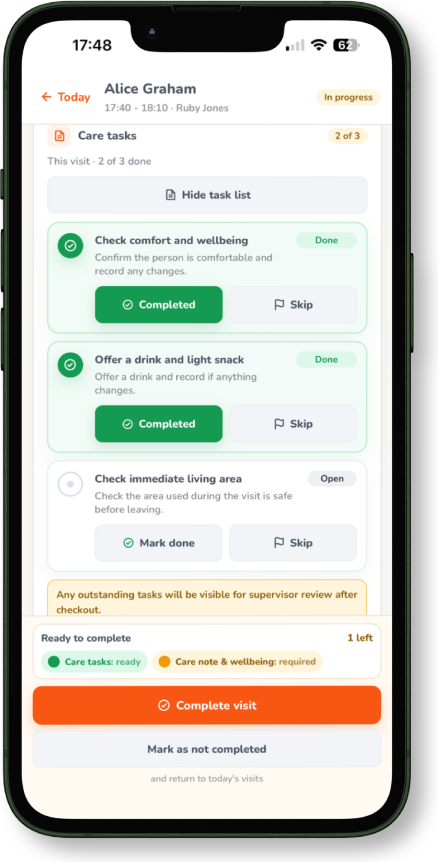
Carers can see the visits they are expected to complete, the order of the day and the key information needed before arriving at each home.
The carer view is designed around the work happening now: relevant client information, visit prompts, care tasks, medication-related actions where enabled and notes that need completing.
Care notes and wellbeing details can be captured close to the visit, reducing delayed paperwork and helping managers review clearer information.
Carers can raise concerns or flags for office review, so important details do not sit unnoticed in messages or wait until the end of a shift.
When the office updates the rota, CareFlag helps keep the carer's working day connected to the latest visit information and follow-up actions.
No. This page describes tools for professional domiciliary care workers delivering care for a provider.
Yes. CareFlag is designed as a phone-friendly web app for supported browsers, so carers can use it while working away from the office.
Yes. Workflows can be configured to keep the day-to-day screen focused, while essential record fields remain available.
Tell us a little about your agency and what you want to improve. We will come back to you with next steps.
Apply to join the founding pilot